• Skip to main content
  • Skip to main content
Choose which site to search.
University of Arkansas for Medical Sciences Logo University of Arkansas for Medical Sciences
Supply Chain
  • UAMS Health
  • Jobs
  • Giving
  • Informatics
    • About Us
    • Contact Us
    • Payee Setup
    • Vendor Setup
    • Item Master Forms
  • Procurement
    • About Us
    • Contact Us
    • Forms
    • Resources
    • Procurement Procedures
      • Pre-Purchase
        • Before Making A Purchase For UAMS
        • Utilizing Current Contracts and Agreements
        • Pricing Documentation for Requisitions
        • Source Selection
        • Competitive Bid Quote, Purchases $20,000 – $75,000
        • Sealed Bid-Proposal, Purchases Over $75,000
        • Expense Contract Reference Guide
        • Procurement Exemptions
        • Sole Source/Proprietary Procurement
      • Purchase
        • Catalog, Punchout, and Non-Catalog Purchase Requisitions
        • Standard PO vs. Framework PO vs. Supplier Contract
        • Standard PO with a Goods Line
        • Standard PO with a Service Line
        • Framework PO
        • Supplier Contract PO
        • Purchasing IT Software, Hardware, etc.
      • Post Purchase
      • P-Card
        • Using a Procurement Card (P-Card)
      • Research
        • Purchasing Gift Cards for Research Participants
      • FAQs
        • Finding A Requisition
        • Finding Important Requisition Information
        • Check On the Approval Status of a Requisition
        • Find a PO for a Requisition
        • End-of-Year Tasks
  • Travel and Expense Reimbursement
    • About Us
    • Contact Us
    • Car Rental
    • Hotel Information
    • Travel Procedures
      • Choosing A Method Of Transportation
      • How To Claim A Rideshare Receipt (e.g., Uber, Lyft)
      • Out Of State Rental Vehicles
      • Claiming Mileage
      • Official Functions
      • Spend Authorization for Travel
      • Spend Authorization with Cash Advance
      • Travel For Worker
      • Travel For Non-Worker
      • Travel For Pre-Hire
      • Reconcile Travel Card (T-Card) Expenses
      • Spend Authorization & Expense Report Workday Enhancements – 11/21/23
    • Forms
    • UAMS Admin Guide Travel Policy
  • Contract Services
    • About Us
    • Contact Us
    • Independent Contractor Information
    • Mandatory State and Co-Op Contracts
    • Ntracts Resources
    • Professional Technical and General Contract Services
    • Physician Search Firm
  • Operations and Logistics Management
    • About Us
    • Asset Management Services
    • Linen Services Contact Information
    • Central Receiving
      • Receiving Dock Hours and Location
      • UAMS Shipment Addresses
      • Package Tracking
      • Material Safety Data Sheets (MSDS)
      • Central Receiving Forms
    • Freight Management
      • Vendor Shipping Guidelines
    • Property Services
      • Low Value Assets
      • Forms and Manuals
      • Property Services FAQs
    • Stock Supply Catalogs
  • Value Analysis
    • About Us
    • Contact Us
    • Workflow for New Product Requests
  1. University of Arkansas for Medical Sciences
  2. Supply Chain
  3. Informatics
  4. Vendor Setup

Vendor Setup

A business/entity needs to be set up as a vendor if they will provide goods/services to UAMS.

Types of Payees Classified as Vendors:

  • Honorariums/Guest Speakers
  • Supplier/Vendor providing services to UAMS (e.g., landscaping, laundry)
  • Supplier/Vendor providing goods to UAMS (e.g., medical items, paper products)

Note: UAMS may only order goods/services from a vendor after the vendor is set up in Workday. Vendor work may not be initiated before setup.

Process Summary

  1. Supplier registers with PaymentWorks
  2. Supplier is added to Workday
  3. Supplier can do business with UAMS

About Payment Works

PaymentWorks is a vendor management system that verifies the information of all parties conducting business together (e.g., banking information, contact information, tax ID)

PaymentWorks allows UAMS to ensure that information provided by a supplier is accurate and secure, thereby minimizing opportunities for fraudulent activities.

Note: Setting up new vendors and/or updating information for existing vendors requires registration with PaymentWorks and Workday.

Verifying Vendor Status

For new vendors, begin by searching for the vendor in Workday to ensure they are not already established vendors.

IF the search results include the vendors name and the designation “Supplier,” then the vendor is registered in some capacity, and you should proceed to the instructions for existing vendors.

IF the search results confirm the vendor is not established in Workday, open your PaymentWorks app and send the vendor an invitation to register with PaymentWorks. For step-by-step instructions to send an invitation, refer to Sending Invitations Through PaymentWorks.

Note: You must use your UAMS.edu email address when filling out the invitation in PaymentWorks.

For existing vendors, begin by finding the vendor in Workday and checking their Supplier Group.

Follow the steps below to check a vendor’s Supplier Group.

  1. Search for the Vendor in Workday.
  2. Click on the search result that indicates “Supplier”
  3. From the Overview Summary tab (default view), check the Supplier Group field.

Vendor Maintenance Instructions Based on Supplier Group

IF Supplier Group = PaymentWorks Connected AND UAMS Approved Supplier

The vendor is fully registered with PaymentWorks and has been approved to do business with UAMS. You may proceed to initiate work/business with this vendor.

If the vendor needs to update their information, the vendor will have to log into their PaymentWorks account and manage their information. See the Additional Help and Resources section below for information to help vendors with PaymentWorks.

IF Supplier Group = UAMS Approved Supplier

The vendor is vetted and approved to do business with UAMS, but is not registered in PaymentWorks (this is more common with vendors that were setup before UAMS began using PaymentWorks for vendor management).

If the vendor needs to update their information, the vendor will first need to register (or complete registration) with PaymentWorks.  For instructions on PaymentWorks registration, see the information above for new vendors.

IF Supplier Group = PaymentWorks Connected 

The vendor is registered with PaymentWorks to do business with another UA entity but is not approved to do business with UAMS. The vendor must complete additional steps to become a UAMS Approved Supplier.

The screenshot below shows the field that Vendors must select in their PaymentWorks registration to initiate the request to become a UAMS Approved Supplier.
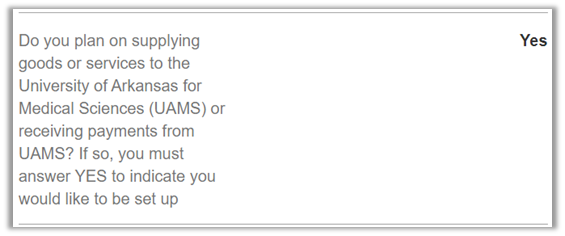
Do you plan on supplying goods or services to the University of Arkansas for Medical Sciences (UAMS) or receiving payments from UAMS? If so, you must answer YES to indicate you would like to be set up

Additional Help and Resources

For detailed, step-by-step guidance and searchable support topics, visit the PaymentWorks Help Center.

For additional questions or assistance, reach out to the Vendor Setup team at VendorSetup@uams.edu.

University of Arkansas for Medical Sciences LogoUniversity of Arkansas for Medical SciencesUniversity of Arkansas for Medical Sciences
Mailing Address: 4301 West Markham Street, Little Rock, AR 72205
Phone: (501) 686-7000
  • Facebook
  • X
  • Instagram
  • YouTube
  • LinkedIn
  • Pinterest
  • Disclaimer
  • Terms of Use
  • Privacy Statement
  • Legal Notices

© 2025 University of Arkansas for Medical Sciences