
This Help Page was developed to support Requisitioners and Cost Center Managers as they transition from one fiscal year to the next. It contains information on common end-of-year tasks.
Table of Contents
Closing POs/ Requesting POs to be Closed
What does it mean to close a Purchase Order (PO)?
We close POs in Workday to prevent further action against it or to liquidate any remaining obligation balance.
Once a PO is closed, it can no longer be used for creating receipts or invoices.
Read the Pre-Closing Tasks section for guidance on how to determine if a PO is ready and suitable for closing.
PO Obligations and the Fiscal Year
At the end of each fiscal year, all remaining purchase order obligations are rolled forward into the next fiscal year.
RPT – OUTSTANDING PURCHASE ORDER OBLIGATIONS can be used to identify remaining PO obligations.
In addition to the Outstanding PO Obligations report, remaining obligation amounts on a PO can be viewed from the Balances section of a PO.
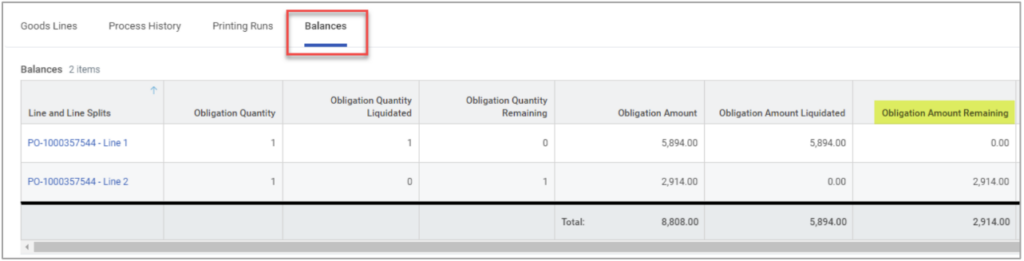
How is a PO closed?
Requisitioners must email their assigned Buyer to close a PO. However, they must first complete Pre-Closing Tasks.
If you have multiple POs to close, please send one email with a list of all the POs you are requesting to have closed.
Pre-Closing Tasks
Prior to requesting your assigned Buyer to close a PO, the requesting department should confirm:
There are no receipts In Progress or in Draft status
AND
There are no invoices in Draft, Incomplete, or In Progress status.
A Buyer cannot close a PO if a related receipt or invoice have Draft, In
Progress, or Incomplete statuses.
There are no lines on the PO for which an invoice is still expected. This
applies to PO lines that have been received, as well as PO lines not yet
received.
RPT – PURCHASE ORDERS RECEIVED NOT INVOICED can identify PO
lines for which receipt quantities are greater than invoiced quantities.
Findings on the report indicate the POs shown on the report are not ready to
be closed.
For information about how to resolve PO issues identified by the RNI report,
read Help Page – Utilizing the RNI Report.
There are no lines on the PO that need to be received. This applies to PO
lines that have been partially received, as well as PO Lines not yet received.
RPT – FIND SUPPLIER INVOICE LINES IN MATCH EXCEPTION (UAMS)
can identify lines that have been invoiced but are held up due to receipt or
pricing issues.
For information about how to resolve match exceptions caused by invoicing
issues, read Help Page – Understanding Invoice Match Exceptions.
There are no lines on the PO which will be needed for verification of a
P-Card transaction by a Buyer. If you are unsure whether the PO line is
still needed for a p-card transaction verification, please reach out to your
assigned Buyer.
Understanding Invoice Match Exceptions
RPT – Supplier Invoice Lines in Match Exception (UAMS) is a report that can be
used to identify invoices in match exception.
What does invoice matching mean?
Before UAMS pays an invoice, it must be verified that the quantity and cost
information matches across the PO, Invoice, and Receipt.
Invoice Matching is when Workday compares a supplier invoice with supporting documents (purchase orders and receipts) to verify that the information is correct prior to issuing payment to a supplier for that invoice.
When does an invoice go through matching?
The Supplier Accounts Match Process is initiated if the invoice is procurement-related and does not have a Match Status of Override. In other words, any invoice that is created against a purchase order will run through the matching process.
What causes match exceptions?
A match exception occurs when:
- The quantity or price on a supplier invoice line is higher than the quantity ordered on the purchase order line.
- The quantity on a supplier invoice line is greater than the quantity received on the purchase order line.
- There is an additional line on a supplier invoice that is not found on the purchase order.
How do I resolve match exceptions?
The table below summarizes the most commonly occurring match exceptions at UAMS and their respective solutions.
| Match Exception Type (Supplier Accounts Match Rule) | Routing Destination for Resolution | Instructions for Resolution* |
|---|---|---|
| Supplier Invoice Line Missing a Receipt | Requisition Requester | Create a receipt for the items that were provided by the supplier |
| Total Invoiced Quantity is greater than the Total Receipt Quantity | Requisition Requester | Create a receipt for the additional items that were provided by the supplier |
| Additional Invoice Lines Not on PO | Purchase Order Buyer (Procurement Specialist) | Change order to add the additional line |
| Amount Variance between Invoice line Extended Amount and PO line Amount exceeds $100 or IF UAMS and dollar amount exceeds 5% on line or $50 | Purchase Order Buyer (Procurement Specialist) | Change order to adjust the PO line unit cost / line extended amount. |
| Percent Variance between Sum of Invoice Line and PO Line Extended Amounts is greater than 10% | Purchase Order Buyer (Procurement Specialist) | Change order to adjust the PO line unit cost / line extended amount. |
*Please note instructions in the table above only apply if the supplier quantity/price is correct.
If UAMS had the correct pricing on the purchase order but the Supplier overcharged on the invoice, then you or your Buyer will need to work with the supplier to dispute the pricing and obtain a credit memo for the difference.
Utilizing the RNI Report
RPT – Purchase Orders Received Not Invoiced is a Workday report that can
identify PO lines where receipt quantities are greater than invoiced quantities.
If your department has POs this report, there are four possible causes/solutions:
Missing Invoice
If the items were received, but UAMS is missing an invoice, request an invoice
from the supplier.
Once you obtain the missing invoice, email the invoice to
accountspayable@uams.edu.
Over-Received or Items Returned
If PO lines have been over-received or erroneously received, the receipt quantities need to be adjusted.
Receipt quantities can be corrected by:
- Cancelling the receipt
Cancel a receipt when all lines on the receipt should be taken down to zero. - Creating a receipt adjustment
Adjust a receipt when the quantity on a line needs to be decreased (but not decreased to zero).
Or
Adjust a receipt when only one line on the receipt needs to be decreased to zero. - Creating a return
Create a return when items on a PO were received, then later returned to the supplier.
Over-Charged
When Accounts Payable posts a credit invoice as a supplier invoice adjustment, the invoiced quantity of that PO line will be offset.
When this happens, you should request for the PO line or PO to be closed.
Items Received, No Invoice Expected
You can request to close individual PO lines to prevent receipt accruals when you receive items or services, but do not expect to receive an invoice.